
Managing orders in Excel or in a system?
Excel is enough when one person handles a few orders. Once several people work on the same sheet it starts to break: no history per customer, no tasks or owners, hard to use on a phone, and nobody knows what changed. A system like Dougri keeps customers, leads and orders in one place, with statuses, tasks and owners.
What does Excel do well?
Plenty of businesses run their orders in Excel and keep an Excel sheet to manage customers, or use Google Sheets, and for good reasons:
- It is close to free. Google Sheets costs nothing, and Excel is usually on the computer already.
- It is flexible. Any column, any colour, any formula you like, without asking anyone.
- Everyone knows it. There is nothing to learn, and a new hire can use it on day one.
- It is good at numbers. Totals, reports and charts are exactly what it was built for.
Where does managing orders in Excel break?
The sheet does not break in a day. It breaks as the business grows, as another person joins, and as orders arrive from more places:
- Several people edit the same file. A file passed around by email splits into versions, and in a shared sheet anyone can change or delete any cell, by mistake too.
- No history per customer. One customer's orders are spread over different rows, and their files sit in email and WhatsApp.
- No tasks or owners. An “Owner” column tells nobody what to do today or what is already late.
- No usable phone view. A wide sheet with twenty columns cannot be read on a phone screen, just when you are out of the office.
- Leads are typed in by hand. An enquiry from the website form or a Facebook ad has to be copied into the sheet, and whatever is not copied is lost.
- Nobody knows what changed. Someone updated a status in row 214, and nobody else noticed.
Excel vs an order management system: what is the difference?
| Topic | Excel or Google Sheets | Dougri |
|---|---|---|
| Cost | Free or part of Office | From ₪249 a month + VAT, plus one-time onboarding |
| Flexibility | Any column or formula you like | Your own statuses and sales stages, within a fixed structure (on Solo: statuses from a ready-made template) |
| Several people at once | Anyone can change any cell | Roles and permissions: each person sees and does only what they are allowed to |
| Customer history | Rows spread across the sheet | A customer card with every order and file |
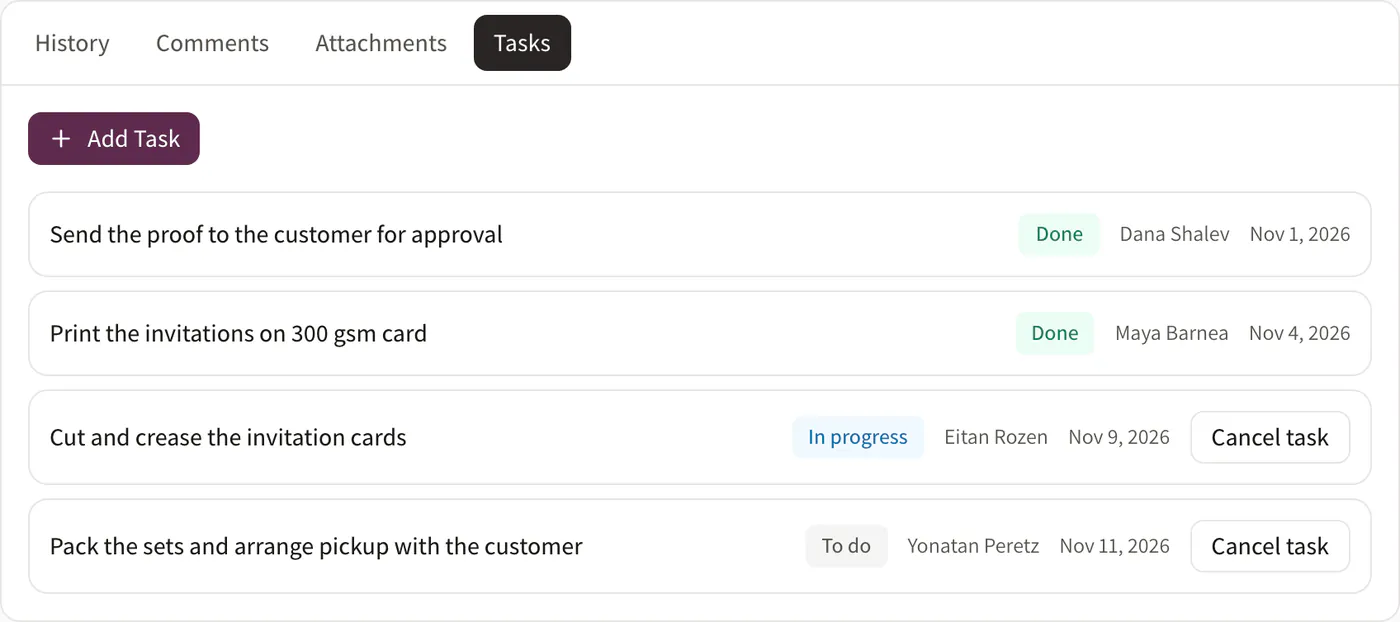
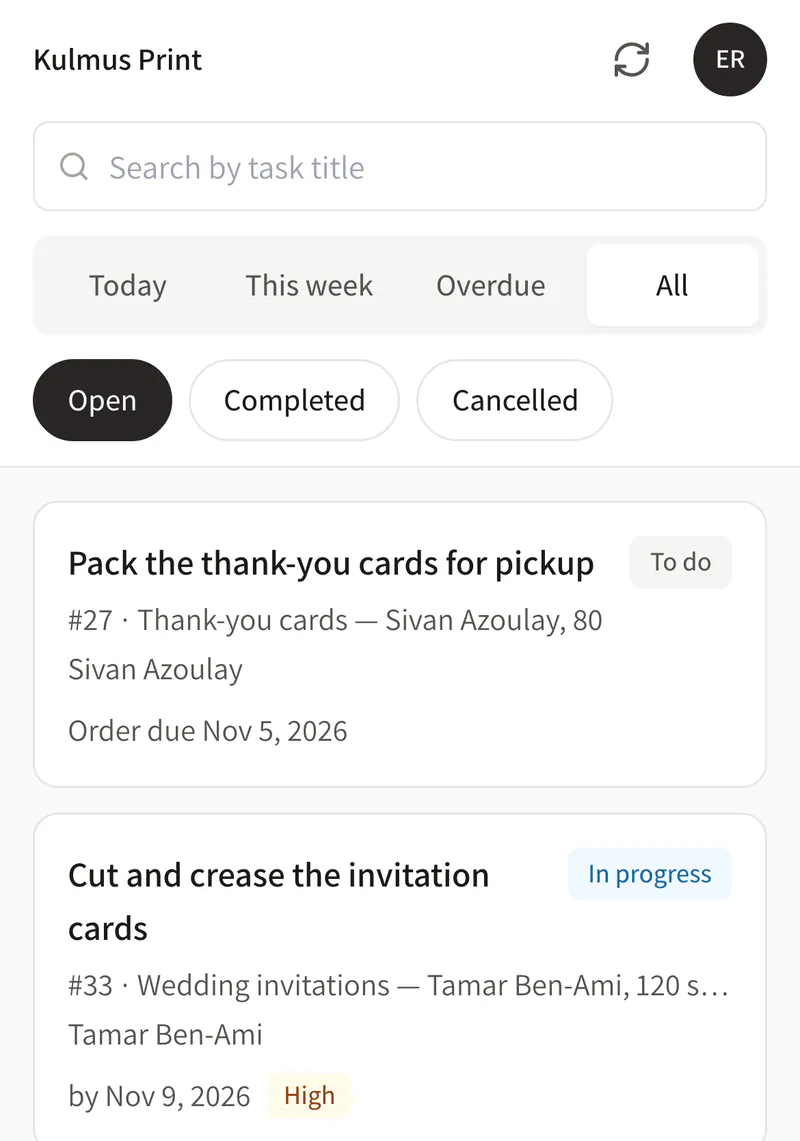
| Tasks and owners | A column in the sheet | Tasks with an owner and a due date, and a “My tasks” list on the phone |
| What changed | You have to remember or search | Changed orders are flagged in the list |
| Leads | Typed in by hand | Come in from website forms, Facebook and Instagram lead ads, and Calendly (we connect them during onboarding) |
| Phone | A wide sheet on a small screen | Works in the phone's browser and can be added to the home screen |
Full prices for every plan are on the pricing page.
When is Excel enough for a small business?
If you are a one-person business with a few orders a week, no team to keep up to date and enquiries from only one place, Excel is probably enough, and there is no reason to pay for a system.
It is time to look at a system when you see one of these signs:
- More than one person updates the sheet.
- An order or an enquiry has already fallen through the cracks.
- You ask on WhatsApp “what's the status of the order for…?” several times a day.
- You need to check an order from your phone, away from the office.
How do you switch from Excel to a system?
A tidy switch takes a few simple steps. The setup itself we do with you during onboarding:
- Tidy the customer sheet. One row per customer, with columns for name, phone and email. Save the file as CSV (in Excel: “Save As”).
- Import customers and leads. Dougri imports customers and leads from a CSV file.
- Set up statuses and stages. During onboarding we set up your order statuses and sales stages with you, the way you work today, along with users and permissions.
- Add the open orders. Orders are not imported from a file. Start with the orders still in progress, and keep the old history in the file.
- Pick a switch-over day. From that day every new order goes into Dougri, and you only open the spreadsheet to look up old history.
Want an orderly migration plan? Read the guide Moving from Excel to a management system without stopping work. Handling enquiries on WhatsApp? Read also when managing customers on WhatsApp stops being enough. What else is in Dougri? See what's inside.
Questions about moving off Excel
Can I import my Excel sheet into Dougri?
Yes, for customers and leads: save the sheet in Excel as a CSV file and import it into Dougri. Orders are not imported from a file. You add the orders that are still open in Dougri, and the old history stays in the original file.
Is Excel enough for a small business?
For a one-person business with a few orders and no team, Excel is usually enough. A system like Dougri pays off when several people update the same orders, when enquiries come from several places, and when you need to see orders and tasks on your phone.
What does it cost to move from Excel to Dougri?
Dougri's Solo plan costs ₪249 a month + VAT, and onboarding on Solo is a one-time ₪490 + VAT. On Solo the statuses come from a ready-made template, and onboarding sets up your sales stages and users. Every plan and price is on the pricing page.
Can I get my data back out to Excel?
Yes. Your company admin can export customers and leads from Dougri to a CSV file that opens in Excel. The data you put into Dougri belongs to you.
Do I have to stop using Excel altogether?
No. You can keep using Excel for calculations and reports. What is worth moving to Dougri is the day-to-day work: customers, leads, open orders and tasks, so the whole team works from one place and sees the same picture.
A CRM instead of Excel: what do you get?
Instead of one sheet everyone edits, a CRM gives you a card per customer with every order and file, a lead board with stages, tasks with an owner and a due date, and permissions for each person on the team. In Dougri the CRM and orders are in the same system, in Hebrew and English.
Who does the setup?
The team at LET ME, the company behind Dougri. Onboarding sets Dougri up the way the business works: statuses, sales stages, users and permissions, and we train the team.
Want to see it with your business?
A free demo, about half an hour on Zoom or by phone. We show you Dougri on orders and customers like yours.
Book a demo or pick a time in our calendar (opens in a new window)